
Arch - AI Home Design
APPNATION ASArt & Design
4.3453.00 Reviews
- Version
- 2.20.6
- Installs
- 1.00M
- Age Rating
- Everyone
Screenshots
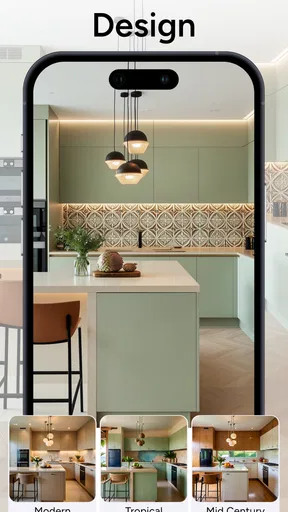
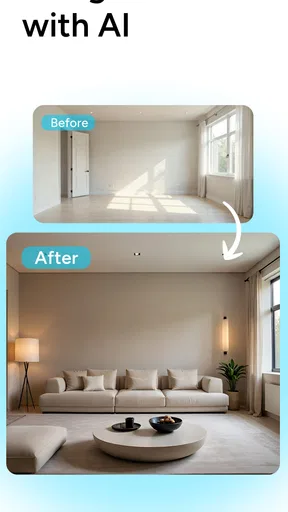
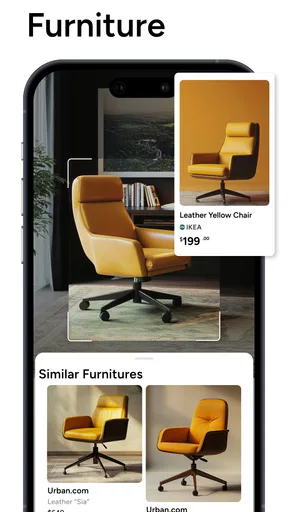
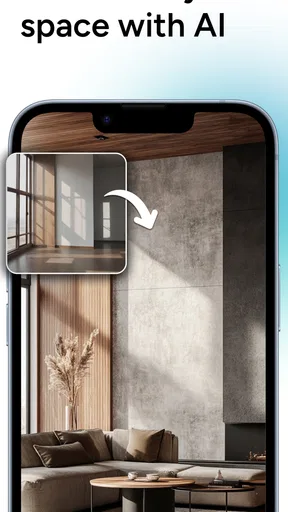
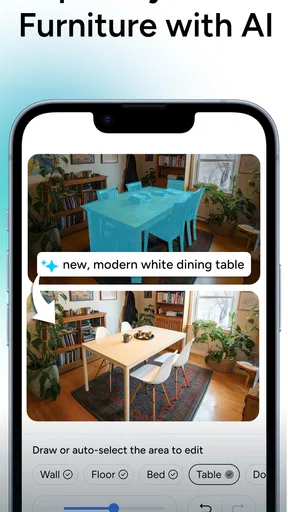
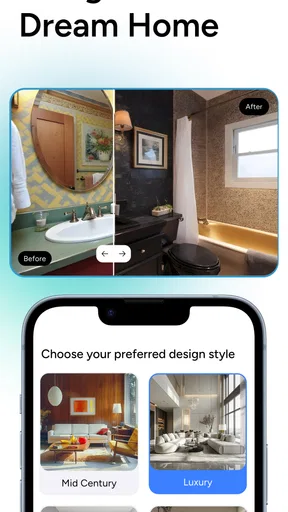
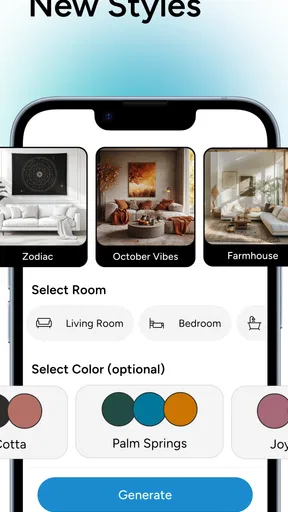
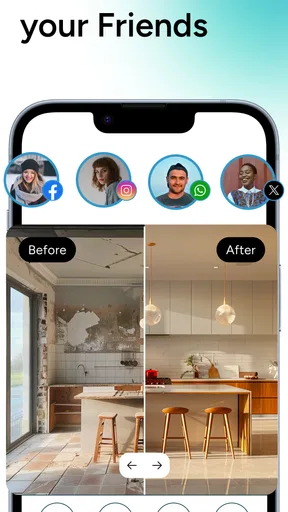
Our Review of Arch - AI Home Design
 Analysis by Appyee
When a room needs a new direction, the hardest part is often getting from a vague idea to a choice you can actually picture. I found Arch - AI Home Design most useful as a way to explore possibilities before committing to paint, furniture, or a larger change. It is an art and design app from APPNATION AS, and its AI-led approach makes it feel more like a visual brainstorming tool than a traditional planning program. That distinction matters: it can help you imagine a room, but it should not replace careful measuring or a professional plan for construction.
Where the first steps can feel unclear
The basic promise is appealing, but new users may still wonder what to do first: choose a room, settle on a style, or figure out what they want to change. I recommend starting with one clear goal rather than trying to redesign an entire home in a single session. For example, decide whether you want to explore a calmer color palette, make a living room feel less crowded, or compare a few broad looks. A specific question gives the AI suggestions a useful direction and makes it easier to judge the results.
It also helps to separate inspiration from a finished plan. A generated concept can show a mood or arrangement that appeals to you, yet it is not automatically a precise representation of your room or a shopping-ready specification. I would treat early results as prompts: notice which colors, materials, or furniture placements you like, then use those observations to guide the next pass. That keeps the process enjoyable without mistaking a visual idea for a guaranteed real-world outcome.
Checks that make a design session smoother
Before starting, take a moment to decide what must stay in the room. A sofa, desk, rental restriction, or awkward corner can shape every other choice. Keeping those constraints in mind helps you evaluate whether a proposed look is practical rather than merely attractive. If you are working toward a real purchase, measure the relevant space separately and compare any product dimensions through the retailer or manufacturer; a visual preview alone is not a reliable measuring tool.
On the phone, a clear, well-lit room photo is a sensible starting point for any image-based design workflow. Try to include the main area you want to rethink and avoid clutter obscuring the details that matter. If a result looks strange, first check whether the image itself gives a clear view, then try a simpler design direction. These are general troubleshooting steps, not a guarantee that every generation will interpret a room exactly as you intended.
The app is free to download, though in-app purchases range from $4.99 to $89.99 per item, so I would explore the available experience before paying for anything. The age rating is Everyone, and the app has a 4.4 average from around 33,000 ratings, with more than one million installs. It was released on May 29, 2023, and version 2.14.2 supports Android 8.0 and later. Those figures give a sense of its reach, but they do not tell you whether its particular workflow suits your project.
Using Arch as a practical design aid
In everyday use, the best way to get value from a design app is to make decisions in stages. Begin with the room’s purpose, move on to its overall mood, and only then think about individual pieces. This avoids spending time comparing decorative details before you know whether you want the space to feel brighter, more restful, or more functional. I also find it useful to save or note what works in each concept, rather than treating any single image as the final answer.
From a quick idea to a useful comparison
Imagine that you are considering a change to a small living room after work. You have a few minutes, not an afternoon to learn design software, and you are unsure whether a warmer or more minimal look would suit the space. A focused session can help you compare those directions and identify a detail worth testing, such as a lighter wall color or a less busy arrangement. You can then discuss the idea with anyone sharing the room before spending money.
One useful, less obvious habit is to change only one major design choice at a time when comparing concepts. If you alter the style, color palette, and furniture arrangement all at once, it becomes difficult to tell which change made a result feel better. Keeping most of the brief steady makes comparisons more meaningful. Another is to view a promising idea on the actual device and in ordinary lighting, then revisit it later; a design that feels exciting in the moment may not fit your household’s daily needs.
The visual tools described for the app may make it tempting to rely on 3D views or augmented reality as proof that an item will fit. I would use those views to judge general appearance and placement, not exact scale, clearance, or compatibility. Before buying a sofa, for instance, check the doorway, walking path, and room dimensions independently. The trade-off is straightforward: visual previews can make choices easier to discuss, while physical checks remain essential for decisions that involve fit or cost.
Where it sits beside other design options
Compared with drawing a room from scratch in a conventional planner, an AI-oriented app can be a friendlier way to get unstuck when you do not yet have a clear design vocabulary. You can start with a feeling or broad style rather than carefully constructing every element yourself. By contrast, a dedicated floor-plan tool is usually the better choice when accurate dimensions, measured layouts, or renovation coordination are the priority. Arch is most persuasive at the idea stage, where seeing alternatives can help you decide what to explore next.
It also differs from browsing furniture catalogs. Catalogs are useful when you know what you want to buy and need product details; design concepts are useful when you are still working out the look and arrangement. The app’s described furniture and decor library can make inspiration feel more concrete, but I would verify availability, dimensions, and purchase terms outside a visual concept before treating an item as a confirmed choice. That extra step is especially worthwhile if you are furnishing a shared home or working to a strict budget.
Recovering when a result misses the mark
If a design comes back unlike what you pictured, I would not immediately assume that the app or the phone has failed. First simplify the request: choose one room, one broad style, and one change you care about. Then check whether your source image clearly shows the area you want considered. A crowded or poorly framed photo can make it harder to judge a result, and a brief that asks for several competing changes can make the outcome feel unfocused.
When the interface feels slow or a step does not behave as expected, basic checks are worthwhile: confirm that the phone has a stable connection if the task depends on online processing, close and reopen the app, and make sure the installed version is current. If a problem continues, note what you were doing and whether it happens repeatedly before seeking help. I would avoid repeatedly submitting the same request without changing anything; a smaller adjustment makes it easier to see whether the issue came from the prompt, the image, or a temporary interruption.
When another tool—or a person—is the better choice
This is not the right fit for every home project. If you need measured drawings for a contractor, dependable construction guidance, or a precise bill of materials, use an appropriate planning tool or consult a qualified professional. Likewise, if you already know the exact furniture you want, a retailer’s own specifications and room-planning resources may answer practical questions more directly. AI-generated inspiration is helpful for exploring taste, not for certifying safety, structural feasibility, or product fit.
It may also be less appealing if you prefer full manual control or dislike paying for optional features. The app is free to start, but the listed in-app purchase range is broad enough that I would check what is included in any purchase before confirming it. For a casual user, experimenting with a few concepts may be enough; someone expecting a complete, precise renovation workflow should compare specialist alternatives first.
A closer look at the creative experience
The app’s most promising role is helping people who have ideas but struggle to picture them. Its AI suggestions can give a starting point, while the described 3D and augmented-reality views offer ways to consider a room from different perspectives. In my view, that combination is most useful for narrowing preferences: you might discover that you prefer a simpler arrangement or a warmer atmosphere, even if you do not use the exact design shown.
There is a practical trade-off in having a visual library and community inspiration alongside the design process. Seeing other people’s work can spark ideas, but it can also tempt you to copy a look that does not suit your room, budget, or habits. I would use examples to identify one element you genuinely like, then adapt it to your own constraints. A room has to work for the people who use it, not just look appealing in a preview.
Who is likely to enjoy it?
I would recommend trying it if you are redecorating, furnishing a first home, or helping a household compare styles before making a decision. It can also suit renters who want to explore reversible changes, provided they keep lease restrictions in mind and do not treat a mock-up as permission to alter the property. People who enjoy visual experimentation may appreciate being able to test an idea before they commit to a shopping list.
On the other hand, someone who wants precise architectural plans, exact product matching, or a completely hands-on design process may be happier elsewhere. The same goes for a user who expects every generated image to reproduce the room faithfully. I would approach it with curiosity and a willingness to refine rather than expecting a single tap to solve a complicated design problem.
First impressions and the learning curve
When you first open Arch - AI Home Design, you’re greeted with a sleek and modern interface. It’s intuitive, which is a big win because who wants to spend hours learning how to navigate an app, right? The design feels fresh, with its color palette adding a nice touch of sophistication. The app is all about ease of use, and it nails it from the get-go.
Features That Stand Out
Let’s talk features. This app is packed with tools that make designing your space feel less like a chore and more like an adventure. With the AI-powered suggestions, you can get personalized design ideas that match your taste. It’s like having a design assistant who just gets you.
The 3D visualization is another game-changer. You can walk around your virtual space, rearrange furniture, and even play with different color schemes. It feels almost magical to see how your ideas come to life. Plus, the augmented reality feature lets you visualize how that new couch will look in your actual living room before you make any decisions.
User-Friendly Experience
One of the things that struck me was how user-friendly the app is. The process is straightforward: choose your room, select a style, and let the app work its magic. And if you’re ever stuck, the app offers helpful tips and tutorials to guide you through.
The app also includes a comprehensive library of furniture and decor items. Whether you’re into modern minimalism or rustic charm, there’s something for everyone. And the best part? You can purchase items directly through the app. Talk about convenience!
Community and Inspiration
Another cool feature is the community aspect. You can browse through designs from other users, which is perfect if you’re looking for inspiration. Plus, you can share your own creations and get feedback. It’s like being part of a vibrant community of design enthusiasts.
The app regularly updates its content, so you’ll always find something new. Whether it’s fresh design ideas or the latest decor trends, it keeps the creative juices flowing.
A balanced take on the promise
Even with an easy interface, I would keep expectations grounded. A polished concept can help me make sense of a room, but it cannot account for every practical detail that shapes a home, from how people move through it to the exact dimensions of the furniture they already own. I would use the app to open up options, then make the final call with real measurements and the needs of the people who live there in mind.
That balance is what makes this kind of tool worthwhile. It is not necessary to be a design expert to benefit from seeing alternatives, and it is equally sensible to stop using the app when a project becomes technical. For a refresh or an early-stage idea, visual exploration can be enough to get a conversation moving. For a major renovation, it should be one small part of a more careful process.
Final Thoughts
In the end, Arch - AI Home Design is more than just an app; it’s a portal into the world of home design. Whether you’re a seasoned pro or a newbie looking to spice up your space, this app has something for everyone. It’s like having a friend who’s a design guru, always ready to help and inspire.
So, if you’re ready to turn your home into the masterpiece you’ve always dreamed of, give it a try. It’s easy, fun, and incredibly rewarding. Who knew designing a home could be this exciting?
Verdict
Strengths of Arch - AI Home Design
- Intuitive user interface
- Wide range of design templates
- Realistic 3D visualizations
- Customizable design elements
- Fast rendering performance
Limitations of Arch - AI Home Design
- Limited free features
- Occasional app crashes
- Requires high-quality device
- In-app purchases can be pricey
- Needs constant internet connection
Similar Picks in This Category
View All
Canva: AI Photo & Video Editor
Canva4.8

PENUP – Drawing-sharing SNS
Samsung Electronics Co., Ltd.4.5

Crafto
Kutumb App4.6

Sketchbook
Sketchbook4.1

ibis Paint X
ibis inc.4.5

Adobe Express: AI Photo, Video
Adobe4.6
Frequently Asked Questions
What is Arch - AI Home Design, and how does it work?
Arch - AI Home Design is an innovative app that utilizes artificial intelligence to assist users in designing and visualizing home interiors. By uploading photos of your space, the app generates design suggestions and 3D models, allowing you to explore various styles and layouts. It's an intuitive tool for both amateurs and professionals.
Is Arch - AI Home Design suitable for professional designers?
Yes, Arch - AI Home Design caters to both novice users and professional designers. While beginners will appreciate its user-friendly interface and guided tutorials, professionals can benefit from its advanced features, such as customizable templates and high-quality 3D renderings, making it a versatile tool for any design project.
Does the app require an internet connection to function?
While some basic features of Arch - AI Home Design can be used offline, an internet connection is necessary for full functionality. This includes accessing the latest design trends, cloud storage for saving projects, and updates to the AI algorithms that power the app's design suggestions.
Are there any costs associated with using Arch - AI Home Design?
Arch - AI Home Design offers a free version with essential features. However, to unlock advanced tools, such as premium design templates and enhanced 3D visualization options, a subscription is required. The app provides various subscription plans to suit different needs and budgets.
Can Arch - AI Home Design integrate with other design tools?
Yes, Arch - AI Home Design supports integration with popular design tools and platforms. This includes exporting models to CAD software and sharing projects with clients or colleagues via cloud services. These integrations enhance workflow efficiency, making it easier to manage design projects.
